
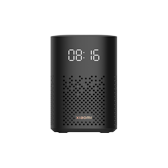
#xiaomi.wifispeaker.l05g
Xiaomi Smart Speaker (IR Control)
urn:miot-spec-v2:device:speaker:0000A015:xiaomi-l05g:2
Language
Service tree
Speaker#2 · speaker2 properties
Speaker
#2 · speaker
Properties
Volume
#1 · volume
- Format
- uint8
- Access
- R / W / N
- Value
- 0 ~ 100, step 1 percentage
Mute
#2 · mute
- Format
- bool
- Access
- R / W / N
- Value
- —
Play Control#3 · play-control3 properties6 actions
Play Control
#3 · play-control
Properties
Playing State
#1 · playing-state
- Format
- uint8
- Access
- R / N
- Value
- 1Playing
Seek Time
#2 · seek-time
- Format
- int16
- Access
- Value
- -30000 ~ 30000, step 10 seconds
Play Loop Mode
#3 · play-loop-mode
- Format
- uint8
- Access
- R / W / N
- Value
- 1Single Cycle
Actions
Seek
#1 · seek
Input
#2Seek Timeint16
Play
#2 · play
Pause
#3 · pause
Stop
#4 · stop
Previous
#5 · previous
Next
#6 · next
Microphone#4 · microphone1 properties
Microphone
#4 · microphone
Properties
Mute
#1 · mute
- Format
- bool
- Access
- R / W / N
- Value
- —
Intelligent Speaker#5 · intelligent-speaker2 properties5 actions
Intelligent Speaker
#5 · intelligent-speaker
Properties
Text Content
#1 · text-content
- Format
- string
- Access
- Value
- —
Silent Execution
#2 · silent-execution
- Format
- bool
- Access
- Value
- —
Actions
Wake Up
#1 · wake-up
Play Radio
#2 · play-radio
Play Text
#3 · play-text
Input
#1Text Contentstring
Execute Text Directive
#4 · execute-text-directive
Input
#1Text Contentstring#2Silent Executionbool
Play Music
#5 · play-music
Clock#6 · clock4 properties1 actions
Clock
#6 · clock
Properties
Switch Status
#1 · on
- Format
- bool
- Access
- R / W / N
- Value
- —
Status
#2 · status
- Format
- uint8
- Access
- R / N
- Value
- 1Idle2Busy
Device Fault
#3 · fault
- Format
- uint8
- Access
- R / N
- Value
- 0No Faults
Ringtone
#4 · ringtone
- Format
- uint8
- Access
- R / W / N
- Value
- 1 ~ 5, step 1
Actions
Stop Alarm
#1 · stop-alarm
IR TV Box Control#7 · ir-box-control1 properties13 actions
IR TV Box Control
#7 · ir-box-control
Properties
Channel Number
#1 · channel-number
- Format
- uint16
- Access
- Value
- 1 ~ 999, step 1
Actions
Turn On
#1 · turn-on
Turn Off
#2 · turn-off
Volume Up
#3 · volume-up
Volume Down
#4 · volume-down
Mute On
#5 · mute-on
Mute Off
#6 · mute-off
Set Channel Number
#7 · set-channel-number
Input
#1Channel Numberuint16
Play
#8 · play
Pause
#9 · pause
Stop
#10 · stop
Toggle Caption
#11 · toggle-caption
Channel Down
#12 · channel-down
Channel Up
#13 · channel-up
IR TV Control#8 · ir-tv-control2 properties15 actions
IR TV Control
#8 · ir-tv-control
Properties
Channel Number
#1 · channel-number
- Format
- uint16
- Access
- Value
- 1 ~ 999, step 1
Channel Name
#2 · channel-name
- Format
- string
- Access
- Value
- —
Actions
Volume Up
#1 · volume-up
Volume Down
#2 · volume-down
Channel Up
#3 · channel-up
Channel Down
#4 · channel-down
Turn On
#5 · turn-on
Turn Off
#6 · turn-off
Mute On
#7 · mute-on
Mute Off
#8 · mute-off
Set Channel Number
#9 · set-channel-number
Input
#1Channel Numberuint16
Set Channel Name
#10 · set-channel-name
Input
#2Channel Namestring
Play
#11 · play
Pause
#12 · pause
Stop
#13 · stop
Toggle Caption
#14 · toggle-caption
Toggle Caption
#15 · toggle-caption