
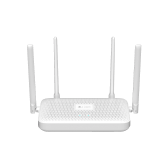
#xiaomi.router.cr8819
小米路由器CR8809
urn:miot-spec-v2:device:router:0000A036:xiaomi-cr8819:1
Language
Service tree
Router#2 · router24 properties1 actions3 events
Router
#2 · router
Properties
Status
#1 · status
- Format
- uint8
- Access
- R / N
- Value
- 1Idle2Busy3Delay
Device Fault
#2 · fault
- Format
- uint8
- Access
- R / N
- Value
- 0No Faults
PPPOE Username
#3 · ppp-username
- Format
- string
- Access
- R / W / N
- Value
- —
PPPOE Encrypted Password
#4 · ppp-encrypted-password
- Format
- string
- Access
- R / W / N
- Value
- —
Static IP Address
#5 · static-ip-address
- Format
- string
- Access
- R / W / N
- Value
- —
Subnet Mask
#6 · subnet-mask
- Format
- string
- Access
- R / W / N
- Value
- —
Gateway IP Address
#7 · gateway-ip-address
- Format
- string
- Access
- R / W / N
- Value
- —
DNS IP Address
#8 · dns-ip-address
- Format
- string
- Access
- R / W / N
- Value
- —
DNS Auto Mode
#9 · dns-auto-mode
- Format
- bool
- Access
- R / W / N
- Value
- —
Access Mode
#10 · access-mode
- Format
- uint8
- Access
- R / N
- Value
- 0LAN12 Point 4 GHz Wireless25 GHz Wireless
Received Signal Strength Indicator
#11 · rssi
- Format
- int8
- Access
- R / N
- Value
- -100 ~ 0, step 1
WiFi Band Combine
#12 · wifi-band-combine
- Format
- bool
- Access
- R / W / N
- Value
- —
Online Time
#13 · online-time
- Format
- uint32
- Access
- R / N
- Value
- 0 ~ 10000, step 1 minutes
Prevent Squatter Wifi
#14 · prevent-squatter-wifi
- Format
- bool
- Access
- R / W / N
- Value
- —
Connect Device Ids
#15 · connect-device-ids
- Format
- string
- Access
- R / N
- Value
- —
Multi Freq In One
#16 · multi-freq-in-one
- Format
- bool
- Access
- R / W / N
- Value
- —
Bump Connect
#17 · bump-connect
- Format
- bool
- Access
- R / W / N
- Value
- —
Device Inactive Time
#18 · device-inactive-time
- Format
- uint8
- Access
- Value
- 1 ~ 60, step 1 minutes
Device Inactive Config
#19 · device-inactive-config
- Format
- string
- Access
- W
- Value
- —
Download Speed
#20 · download-speed
- Format
- float
- Access
- R / N
- Value
- 0 ~ 100, step 0.1
Upload Speed
#21 · upload-speed
- Format
- float
- Access
- R / N
- Value
- 0 ~ 100, step 0.1
Connected Devices
#22 · connected-device-number
- Format
- uint16
- Access
- R / N
- Value
- 0 ~ 100, step 1
Network Connection Type
#23 · network-connection-type
- Format
- uint8
- Access
- R / N
- Value
- 1Auto
IP Address
#24 · ip-address
- Format
- string
- Access
- R / N
- Value
- —
Actions
Reboot
#1 · reboot
Events
Device Connect
#1 · device-connect
Arguments
#15Connect Device Idsstring
Device Disconnect
#2 · device-disconnect
Arguments
#15Connect Device Idsstring
Device Long Time Inactive
#3 · device-long-time-inactive
Arguments
#15Connect Device Idsstring#18Device Inactive Timeuint8
WiFi Managerment#3 · wifi9 properties1 actions1 events
WiFi Managerment
#3 · wifi
Properties
WiFi Service Set Identifier
#1 · wifi-ssid
- Format
- string
- Access
- R / W / N
- Value
- —
WiFi Encrypted Password
#2 · wifi-encrypted-password
- Format
- string
- Access
- R / W / N
- Value
- —
Switch Status
#3 · on
- Format
- bool
- Access
- R / W / N
- Value
- —
WiFi SSID Hidden
#4 · wifi-ssid-hidden
- Format
- bool
- Access
- R / W / N
- Value
- —
Encrypted Strength
#5 · encrypted-strength
- Format
- uint8
- Access
- R / W / N
- Value
- 0
Signal Strength
#6 · signal-strength
- Format
- uint8
- Access
- R / W / N
- Value
- 0
WiFi Channel
#7 · wifi-channel
- Format
- uint8
- Access
- R / W / N
- Value
- 1 ~ 14, step 1
WiFi Bandwidth
#8 · wifi-bandwidth
- Format
- uint8
- Access
- R / W / N
- Value
- 20 ~ 40, step 10
Easy Connect Switch
#9 · easy-connect-switch
- Format
- bool
- Access
- R / W / N
- Value
- —
Actions
Optimize Network
#1 · optimize-network
Events
Optimize Network Finished
#1 · optimize-network-finished
Guest WiFi#4 · guest-wifi10 properties
Guest WiFi
#4 · guest-wifi
Properties
Switch Status
#1 · on
- Format
- bool
- Access
- R / W / N
- Value
- —
WiFi Service Set Identifier
#2 · wifi-ssid
- Format
- string
- Access
- R / W / N
- Value
- —
WiFi Encrypted Password
#3 · wifi-encrypted-password
- Format
- string
- Access
- R / W / N
- Value
- —
Encrypted Strength
#4 · encrypted-strength
- Format
- uint8
- Access
- R / W / N
- Value
- 0
Signal Strength
#5 · signal-strength
- Format
- uint8
- Access
- R / W / N
- Value
- 0
WiFi Channel
#6 · wifi-channel
- Format
- uint8
- Access
- R / W / N
- Value
- 1 ~ 14, step 1
WiFi Bandwidth
#7 · wifi-bandwidth
- Format
- uint8
- Access
- R / W / N
- Value
- 20 ~ 40, step 10
Speed Control
#8 · speed-control
- Format
- bool
- Access
- R / W / N
- Value
- —
Max Upload Speed
#9 · max-upload-speed
- Format
- uint32
- Access
- R / W / N
- Value
- 0 ~ 1000, step 1
Max Download Speed
#10 · max-download-speed
- Format
- uint32
- Access
- R / W / N
- Value
- 1 ~ 10000, step 1
Indicator Light#5 · indicator-light8 properties
Indicator Light
#5 · indicator-light
Properties
Switch Status
#1 · on
- Format
- bool
- Access
- R / W / N
- Value
- —
Mode
#2 · mode
- Format
- uint8
- Access
- R / W / N
- Value
- 0Auto
Brightness
#3 · brightness
- Format
- uint8
- Access
- R / W / N
- Value
- 1 ~ 100, step 1 percentage
Color
#4 · color
- Format
- uint32
- Access
- R / W / N
- Value
- 0 ~ 16777215, step 1 rgb
Color Temperature
#5 · color-temperature
- Format
- uint32
- Access
- R / W / N
- Value
- 1000 ~ 10000, step 1 kelvin
Flow
#6 · flow
- Format
- bool
- Access
- R / W / N
- Value
- —
Saturability
#7 · saturability
- Format
- uint8
- Access
- R / W / N
- Value
- 0 ~ 100, step 1 percentage
Auto Lights Off
#8 · auto-lights-off
- Format
- bool
- Access
- R / W / N
- Value
- —
Ambient Light#6 · ambient-light10 properties2 actions
Ambient Light
#6 · ambient-light
Properties
Switch Status
#1 · on
- Format
- bool
- Access
- R / W / N
- Value
- —
Mode
#2 · mode
- Format
- uint8
- Access
- R / W / N
- Value
- 0Auto
Brightness
#3 · brightness
- Format
- uint8
- Access
- R / W / N
- Value
- 1 ~ 100, step 1 percentage
Color Temperature
#4 · color-temperature
- Format
- uint32
- Access
- R / W / N
- Value
- 1000 ~ 10000, step 1 kelvin
Color
#5 · color
- Format
- uint32
- Access
- R / W / N
- Value
- 0 ~ 16777215, step 1 rgb
Saturability
#6 · saturability
- Format
- uint8
- Access
- R / W / N
- Value
- 0 ~ 100, step 1 percentage
Flow
#7 · flow
- Format
- bool
- Access
- R / W / N
- Value
- —
Flow Speed Level
#8 · flow-speed-level
- Format
- uint8
- Access
- R / W / N
- Value
- 0Low1Medium2High
Effect Linkage
#9 · effect-linkage
- Format
- bool
- Access
- R / W / N
- Value
- —
Parking Lights
#10 · parking-lights
- Format
- bool
- Access
- R / W / N
- Value
- —
Actions
Toggle Light Mode
#1 · toggle-light-mode
Toggle
#2 · toggle