
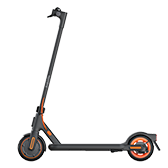
Xiaomi Electric Scooter 4 Go
ninebot.scooter.v13
Basic information
- Product ID
- 9475
- Manufacturer
- 纳恩博
- Category
- Vehicle & Travel
- Release month
- 2023-07
- Status
- Release
- Protocol
- Bluetooth
- Model
- ninebot.scooter.v13
- Gateway required
- Not required
FAQ
1.How do I use the energy recovery function?
The energy recovery intensity can be selected on the homepage of the scooter plug-in in the app.
2.What type of battery is used in this scooter? How do I maintain it?
▪ Lithium-ion batteries are used. ▪ During daily use, try to avoid depleting the battery. Charge it as often as possible instead to extend the battery's service life. ▪ The battery performs better when used within a normal temperature range. If used in environments with temperatures below 0°C, the battery life will be reduced. At -10°C, the battery life may be only half or less than that of room temperature. This is typical for lithium-ion batteries. ▪ If your scooter is not used for more than 30 days, please charge it to at least 80% and store it in a cool and dry place. Fully charge the battery every 1–2 months to extend its service life. Note: If the battery is not charged in time, it may be damaged due to over-discharging, resulting in the inability to be charged. This kind of damage is not repairable nor covered under warranty for free repair.
3.What should I do if the scooter is unable to charge?
▪ Connect the charger to a power source without connecting it to the scooter, if the charger's indicator does not light up or turns red (the indicator should turn green under normal circumstances), it indicates that the charger is faulty and needs to be replaced. Please contact the after-sales service team. ▪ It is possible that the scooter has not been used or charged for a long time, thus over-discharging the battery. Connect the charger to the scooter to try activating the battery. If the battery cannot be activated, it means that it has been seriously over-discharged. Please contact the after-sales service team.
4.What should I do if I can't turn on the scooter?
It may be due to controller failure, severe battery over-discharge, or other errors. Please contact the after-sales service team.
5.How can I determine if an error occurs to my scooter?
When the wrench icon on the control panel blinks red, it indicates that the scooter has an error, and the speedometer will display an error code.